Tuesday, March 8, 2011
Best Ways To Reuse an Old Ipod Charger Dock
5:18 AM


I have a first gen. iPod nano dock that was just lying around the house. It is now useless because I lost my nano a few years ago. So, I was iPod-less for a sort time. After the ipod-blues... I got the iPod Touch. Having no dock for it, I had the brilliant idea of reviving my old lonely nano dock. Instead of buying another one, which is like $$.
Here's how I did it.
Step 1. Things you'll need.

Here are your materials.
- Ruler
- pencil
- sand paper
- swiss knife / leatherman
- iPod nano dock
Step 2. First


Pry off the nano dock with the swiss knife/leatherman. (put some muscle in to it now)
Step 3. Next


Put the part with the circuit and connections aside for a while.
Working on the other panel, measure out the dimensions of the iPod touch and place those measurements to the nano dock, marking it with a pencil.
Step 4. Then..


Use the dremel / rotary tool to cut along the lines you measured and marked.
Sand the edges until it's smooth, so you won't get any scratches on your iPod when you put it in.
Step 5. Finish!


Snap the dock back together. make sure the outlets match the holes.
And presto!! An old new dock for your iPod.
[via instructables]
Monday, March 7, 2011
Top Best Ways to Trade in Your iPod
6:16 AM
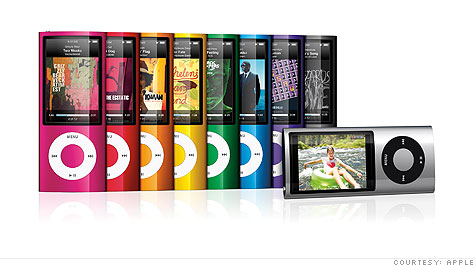
With Apple constantly refreshing their iPod lineup, it can be a pretty frustrating experience for any early adopter trying to keep up with the latest and greatest MP3 players. Here are 5 ways that can ease the burden on your pocket by trading in your trusty old iPod.
Our acid test – Which was the most affordable way (excluding shipping costs) of getting a used 2GB 2nd generation Ipod Nano, still in good condition - upgraded to a 30GB 5th generation Ipod?
Recycle iPods the official way

As part of their environmental policy, Apple is offering environmentally friendly disposal and a 10% discount on the purchase of a new iPod through it’s US retail outlets. With this program as well as others, Apple’s recycling programs worldwide have processed more than 34 million pounds of electronic equipment since 1994.
Acid test results: New Ipod at the Apple store at USD$249 with a 10% discount = USD$224
Get a Cash Return with ‘Beyond The Pod’

Operated by trade in specialists ’Drop Spot’, this service trades on the lowest common denominator … money. You don’t have to buy another iPod from them – just sell your old one to them and pick up another iPod somewhere else.
Acid test results: New iPod from the Apple store USD$249 – Old Nano selling value USD$53 = USD$196
Auction off your old iPod on eBay

If you’re willing to go through the trouble of properly listing a product, and dealing with an auction process on eBay, you may find that the returns on your old iPod to be substantially more than other methods. A quick check on eBay express showed quite a good ‘buy it now’ market value.
Acid test results: New iPod from the Apple store USD$249 – Old Nano potential sale on eBay USD$99 = USD$150
Upgrade, Trade in or Sell your iPod on PodSwap

While sellers could sell their iPods via online auctions, Podswap eliminates all the hassles of listing, collecting payment, shipping, and dealing with post-sale issues. Offering both cash, and trade-ins as options, this service is a very complete solution.
Acid test results: New iPod from the Apple store USD$249 – Old Nano selling value USD$53 = USD$196
Get more money off your old iPod with BuyMyBrokeniPod.com

Started off in USA by Jeremy Cohen and Brett Mosley in 2006, this site has recently gone international. Offering to pick up iPods in any condition whatsoever.
There are a few other competitors out there but we feel our site offers the best prices, simplest use and friendliest customer service. said Mosley and after looking at the numbers – they do seem to be on track with that promise.
Acid test results: New iPod from the Apple store USD$249 – Old Nano selling value USD$67 = USD$182
Conclusion:
If you are a risk taker, eBay looks like the top option for you. If you want something with less hassle – BuyMyBrokeniPod seems to be the best bet.
Otherwise, your best bet is to sell it. Yes, if you purchased your 3rd generation iPod Touch earlier than 2 weeks ago. Is there other ways to make that 10% go higher because I want to trade iPod Trade In Programs - Sell Your iPod - Trade Old iPod for New This is especially good if your iPod is too old to trade or broken. iPods recycled through this program net you a 10% discount on a new iPod purchase. 4 Ways to Use Multiple iPods on One Computer Put all your music in the palm of your hand with an iPod or MP3 player from iPod® Trade-In. Exchange your gently used iPod for a Best Buy gift card.
Most Wanted Ways To Recycle Your Old iPod
5:59 AM


A new iPod is on the way, and everybody loves the latest and greatest. Or maybe that first-generation click-wheeler you bought finally gave up the ghost, and you want to upgrade to a tiny little MP3 player.
If you're like me, you might have a drawer full of old iPods at home (honest, some were gifts!). What can you do with them? If the device is still functional, try giving it away. If friends and family are all set with MP3 players, offer it to your local Freecycle group and someone will surely pick it up.
What about fixing it? Contrary to popular opinion, you can have the battery replaced on an iPod. You'll have to send the device back to Apple. The new battery will cost from $49 to $79 depending on the iPod model, plus shipping and tax.
If the iPod is truly dead, don't just throw it in the trash. The plastics and metals that make up the device can be recycled, if you take it to the right place. The most obvious recycler is Apple itself. You can simply take the old iPod back to any Apple store, and you'll get a 10 percent discount off of a new iPod.
Give your computer a rest
Idle PCs still use electricity. Unplug your computer every night for one month, and you will reduce your CO2 emissions by 51 lbs this month.
Or go to Apple's iPod recycling site, fill out a form, and request a prepaid mailing label. Then send in your old iPod. Apple also recycles cell phones of any make and model (not just iPhones).
Another way to recycle that dead 'pod is the site BuyMyTronics.com. This company buys used gadgets -- even non-working ones! -- and resells them. Broken electronics are scrapped for parts, so they're not wasted.
You get an immediate estimate for your device. I found that a totally dead first-generation iPod could earn about $4, while a working iPod Touch would garner nearly $100. BuyMyTronics also takes cell phones, PDAs, laptop computers, and game consoles.
So don't leave that old, sad iPod sitting in a drawer anymore. And definitely don't chuck it in the garbage. Give it back to Apple or recycle it for cash, and you can move on to the next song with a clear conscience.
Here are ways to recycle 10 of the most common electronic BuyMyTronics may pay as much as a few hundred dollars for your old iPod Recycle Old iPods And Earn Cash First we had mobile phone recycling, now selling your old iPods is becoming all the range. Digital camera has brought revolutionized the way of capturing the We know that the most important thing we can do to reduce our impact on the environment Recycle your computer, phone, or iPod. And you may get something in return. Apple reduces energy use in our facilities in a number of ways.
Sunday, March 6, 2011
Top Best Ways to Reuse Your Old iPod
6:34 PM

You just got a new iPod or other music player over the holidays, and your older iPod looks like Craigslist fodder. Here are at least 10 reasons to re-consider its worthiness.
In general, we're asking anyone thinking about ditching their older iPod to consider what it truly is—a super-slim, substantial storage device, from which you can do, well, just about anything you'd do with a USB or external drive, with a convenient tiny screen and headphone jack attached. So we've compiled ten of our best tools for making the most of an older iPod below. Read on, plug in your tried-and-true iPod, and get creative. Photo by ZabriskiePoint.
1. Make it a flash card player
Whether you're prepping for a presentation or cramming for a test, your iPod can be a much more convenient way to carry your memory-boosting flash cards around than trying to cram a whole deck of 3x5s in your pocket. Mac OSX Hints has a through guide to transforming Keynote slides into iPod-ready picture slides, but any slide presentation maker that can export slides to picture files can create a folder that you simply sync up to your iPod. Your mileage will vary with your screen size and clarity, but for straight-up words, it's a handy hack. Steve Rubel's Micro Persuasion blog details a similar spin on using your iPod as a presentation tool.
2. Instant stereo, just add speakers
 No matter how old your iPod, it's still a pretty efficient music holder and player. If you're hesitant to shell out big cash for a full-fledged stereo system, your trusty iPod is a great hub for your music. CNET details why you should give your iPod speakers, noting the benefits of simultaneously ditching your actual-plastic CDs—or at least putting them deep into storage—and simplifying your music life through the power of "Shuffle." It's not a solution for audiophiles, but it is the start of a no-hassle, instant-on system for any room in the house.
3. Your portable drinks/recipe/Wikipedia reference
 Next time your dinner party or casual chat session turns into a debate about what happened to the star of A Christmas Story or how to properly make a sidecar, pull out your spare iPod and put the details to rest. The fully-fledged Encyclopodia project can put the majority of Wikipedia's useful articles on your iPod without messing up its main functions. iPod Bartender puts just what you think it might into your player, and those who don't like printing or lugging a laptop into their kitchen just for recipe reference should take a look at PodGourmet.
4. Make it your backup drive
 Simple, but supremely useful, enabling and using an iPod's "Disk Mode"—basically opening up for use as a USB drive—pays off in a number of ways. After speeding up your iPod drive with disk defragging, you can boot your Mac from it, use it with most any Windows backup program that lets you choose a save location, automatically back up your Mac home folder with iPodBackup, and generally stash away anything you want on one of the most space-optimized drives around.
5. Free it from iTunes' grasp
 If you live in a world of Windows systems and you're sick of being tied down to iTunes and its memory-hogging tendencies, you don't have to live with it. Back in 2006, Adam showed us how to make a self-sustaining iPod using the free vPod software. vPod's author notes that the tool for directly adding your music doesn't work with the newer firmwares available for most iPods since iTunes upgraded beyond 7.3, but for an older unit that's been gathering dust, that's probably not an issue. For a newer spin on no-iTunes-required, take a look at Adam's newer iPod independence guide, or check out SharePod, Songbird, MediaMonkey a try. And then there's Floola, in a class by itself because it can run directly from your iPod and transfer songs on and off it.
Low-risk uses — like ReadyBoost — might be the best way to keep your Either way, there's simply no better use for an old iPod than to create Best Ways Reuse and Get Creative with Your Old iPhone requires a Moleskine notebook, an iPod Touch (or your extra iPhone), an X-Acto knife, and some PVA glue.
6. Make a stand-alone, bootable XP computer from it
 Sure, you can carry around the portable versions of your favorite Windows apps on your iPod's drive, but you can ensure absolutely nothing gets changed on your friends' and relatives' PCs by booting your own Windows system from your iPod. Gina detailed the process using an XP installation CD and the MojoPac software. The no-restrictions version isn't free ($29.99 for a license), but there's a free version that gives you a virtual XP desktop—and that might be just what you need.
7. Load it up with games
 Apple's iTunes store offers up games for both older video iPods and the newer iPod touch models, but if you're just looking for a little airport time-killing, why pay for your games, or feel forced into an upgrade? Install iPod Linux on nearly any iPod, and you'll be able to play games on your iPod for free. The previously screenshot-toured Rockbox also brings games onto your older music box, but the open-source Linux installation is a bit easier, and the games seem a bit more appealing.
8. Give it a new look with iPodWizard
 If you've got any iPod other than a second or third generation nano, the iPod classic, or the iPod touch, you can give it a new look and feel while keeping its basic controls in place. The free application iPodWizard does it with style, as we've shown you in our walkthrough and screenshot tour. Your friend/frenemy may have the hotter new gear, but only your iPod isn't sport the same old OS-X-lite look.
9. Turn it into an ultimate go-anywhere tool
Shelling out cash for larger jump drives when you've already got an iPod with a minimum of 4GB available isn't necessary. Gina put together a list of apps, files, and tools for putting your life on a portable drive, and these days, the average iPod can hold all that, your music, and probably a sizable batch of video files and photos with it. If, for example, you're never quite sure if you'll have access to a working copy of Microsoft Office when you need it, a full copy of OpenOffice.org 3.0 is available in a no-install, portable version that fits snugly into your little take-everywhere drive, as are plenty of other PortableApps.
10. Make a serious upgrade with RockBox
 Until you've taken the plunge and put Rockbox's new, improved firmware on your older iPod, you haven't seen the significant rebirth a seemingly dated device can undergo. Apple gave you a device that can play music, and maybe display photos or videos as well, but RockBox gives you games ranging from Sudoku to Doom, a calculator, a timer, much greater control over your files from your device, support for a wider range of music files, and much more. Check out our screenshot tour of RockBox 3.0, then go and grab the RockboxUtility for Windows, Mac, or Linux systems.
Recycle Your Old iPod for Cash Payments
One of the newest and most popular music devices of the last 5 years is the Apple iPod. The iPod provides you with thousands of songs or videos on a device that is small enough to fit comfortably in your pocket.
The Waste Problem with iPods
To date Apple have sold just over 206 million iPods worldwide which has created a massive e-waste problem. Apple have designed their iPods to be only be replaceable with another iPod, which is great for Apple but not for the environment. Also the lithium batteries in an iPod can lose more than half their capacity after just a year of use, rather than buying a new battery many users simply purchase the latest iPod, the old iPod then gets thrown in the bin where it ends up on a landfill site where it will not break down and may pollute surrounding soil and waterways, damaging plant and wildlife.
This tiny electronic device that can provide you with thousands of songs and videos at the touch of a button will literally spend thousands of years on a rubbish tip.
Recycle Your Old iPod, Help Save the Environment and Earn Extra Cash
 The great news is that there are now recycling companies where you can send your old working or non-working iPod(s) to be re-used or disposed of correctly, this will stop so many rotting away for many years on on rubbish tips and also help you to get some extra money in your pocket.
How Does it Work?
1. There are now many sites where you can trade in your old, unwanted or broken iPod for cash payments. To find out the various prices for each iPod model visit one of the following mobile recycling sites:
2. Select the iPod you want to sell from either the drop down box on each site or from the picture and add it to your basket. If you would like to add another simply repeat the process.
3. Register your details, accept any terms and conditions and follow through the checkout to submit your order. On the confirmation screen you will be provided with a freepost address which will also be confirmed via email.
4. Once your old iPod has been received it will be quickly checked over then you will be sent payment via whatever method you chose during registration. Payment options on each recycling site range from either cheque, bank transfer, cash at the post office (Mopay only) or for a slightly higher value various shopping vouchers.
Can i Sell Non-Working / Damaged iPods?
Yes, to sell damaged or non working iPods simply follow the standard procedure. Once your old iPod has been received you will be contacted to be offered a revised price.
What do you plan to do with your older iPod, or what have you done in the past when you got an upgrade? Tell us your reuse and renovation stories in the comments.
One of the best ways you can keep toxic electronic waste such as TVs, computers, cell phones, iPods etc out of landfills is by reusing or repurposing your old electronics. You can repurpose an old desk top as a backup server for If none of the above options of reusing your old electronics 10 Great Ways to Get More From Your iPad But when you've run out of ways to reuse or repurpose your old Mac, what's the best way to recycle it? Here are a variety of Top 10 Concerns of Buying a VoIP Business Phone System
Tuesday, March 1, 2011
How To Track Your iPad/iPhone/iPod’s Location?
11:50 AM


The GadgetTrak iOS application has been updated and released in to the iTunes Store and allows you to track the location of your iOS devices. GadgetTrak silently reports its location and senses when your iPhone or iPad has significantly changed its location and the GadgetTrak server keeps track of where your phone has been.
With all of the photos, contacts, apps and music on your iPhone, losing it would be a massive pain. Unfortunately, that pain is felt by thousands of smartphone users every day. Ask them—they wish they'd had GadgetTrak installed.
When your device is missing, log into your account using any web browser and enable tracking immediately. GadgetTrak will spring to life and generate location reports, including map points, longitude & latitude and IP address to help you pinpoint your lost device. It can even snap photos of the thief!
For extra security, enable the "Deleting Apps" restriction in Settings App->General->Restrictions. This will keep the thief from deleting GadgetTrak (and any other apps).
But dont forget the application has to be activated before it can start tracking your iPhone or iPad and when it is activated your battery will use more juice than normal.
Features
Location Tracking
If your device has GPS capability it will be used by GadgetTrak to get the most accurate location possible. Even without GPS, GadgetTrak can use cell towers and/or advanced Wi-Fi positioning technology to pinpoint the location of your device usually within a few meters.
IMPORTANT NOTE: Continued use of GPS can dramatically decrease battery life. For better battery performance, deactivate tracking until the device is lost. The GadgetTrak app does not use GPS and will not impact battery life when tracking is disabled (even if the Navigation icon appears).
Push Notifications
GadgetTrak automatically sends a discrete message to your device, enticing the thief to initiate a tracking report.
Camera Reports
Snap a photo with the built in camera(s) to collect crucial evidence to help Police catch the thief. (available for iOS devices with at least one built-in camera, additional in-app purchase required)
GadgetTrak for iOS is part of a suite of products available for a variety of platforms including Mac OS X and iOS. The software enables you to track and recover devices that hve been lost or stolen. New to the 2.5 release of GadgetTrak for iOS is support for cameras. If your iOS device has a built-in camera – such as an iPhone or iPod touch – GadgetTrak will snap photos to help you ad the police identify the thief and location where the device is. The photo can now be attached to an e-mail; the e-mail also includes location information.

Additional Features
• Locate your device using GPS, cell tower triangulation, and/or WiFi positioning
• Location reports posted to the web control panel at http://trak.me
• Location history to know where your phone has been
• Automatic push notifications
• Camera support for the front and rear-facing camera (in-app purchase required)
• Secure SSL connection for transmitting location data & photos
• Cross Platform: GadgetTrak has apps to protect your laptop (Mac & Windows) as well as Android and BlackBerry phones and tablets.
Need Help?
Download the GadgetTrak iOS Installation & Usage Manual here: http://www.gadgettrak.com/support/downloads
http://www.gadgettrak.com/products/iphone/
We take pride in providing great support for all of our products. If you have questions, concerns, or feedback let us know and we'll get back to you as quickly as possible: http://www.gadgettrak.com/support
What's new
• Remotely capture a photo with all built-in cameras, then email it to yourself to help catch the thief! (via a one-time In-App Purchase)
• Push notifications – Send a discrete message to your device enticing the the person who has it to initiate a tracking event.
• Various Bug Fixes.
GadgetTrak now being offered with select warranty plans ActiveTrak has announced that its GadgetTrak Laptop 3 software is now being bundled We contacted GadgetTrak and they sent us all the information we needed to recover the iPod. Luckily it was not necessary to go to the police.
System Requirement
- Requires iOS 4 or higher
- Background processing only supported on iPad, iPhone 3GS, iPhone 4, and iPod touch 3rd generation or newer
Sunday, February 27, 2011
How To Have All The Latest Gadgets Without Going Broke
1:40 AM


Warning
Before we begin, a word of caution: Go down this road and you will lose money. Don't let anyone tell you otherwise. That said, if you're smart about timing, anal about upkeep, and diligent with your documentation, it's possible to attain bleeding-edge bliss without leaving a trail of financial havoc in your wake. The truly adept upgrader can even come close to breaking even. Here are some guidelines to follow in your new never-ending quest to remain current.
Learn Your Life Cycles and Laws
Moore's Law, Bell's Law, Kryder's Law—someone's always pronouncing them dead or obsolete, but many of these guiding tech principles are the main reason you're continually playing catch-up. The relevant ones also exert tremendous influence over when, how, and why your gear evolves. If you plan on leveling up at regular intervals, you'd do well to familiarize yourself with all of them. Having even a basic understanding of these informal laws can give you a sense of why the laptop you bought two years ago seems old and busted now.
Beyond that, they also shape various tech industry roadmaps. Companies like AMD, Intel and others are all fairly transparent about their update cycles. But figuring out how those plans carry over to actual gadget updates can take some work. For those devoted to Apple products, tools like MacTracker will help you divine specific product release date patterns and pricing history. Unfortunately, PC users don't have anything as useful.
Still, you can also start tracking company announcements and specific release dates yourself by going back and reading gadget sites and company press releases. Once you have a year or two's worth of data, spreadsheet those numbers to look for patterns. Macrumors has already done most of the heavy lifting for Apple upgraders. But you can also set up your own calendar alerts if you're feeling ambitious. It may seem like overkill, but staying one step ahead of new product announcements is paramount to earning top dollar for used gear.

Also, keep in mind that the end of November through the beginning of January (that'd be right now…) is the absolute worst time to sell your gear. With Black Friday/Cyber Monday/X-Mas/CES in the mix, we're right in the middle of new product announcement season. This is also accompanied by heavy discounts from retailers looking to clear inventory. Wait at least until mid-January before you even think of putting your gear on the market.
Save Everything
Resist the urge to toss out receipts, boxes, warranty cards, and other seemingly useless pieces of paper and cardboard. Nothing is more reassuring to a new owner than receiving a gadget that's neatly packaged with all its original materials. Also keeping all your materials will assure potential buyers that you're not a crook. You not only buy yourself a ton of pricing leverage when you save everything, but things like a receipt will also facilitate the transferal of warranty and registration info. If you have unused space in a closet or garage, start constructing your box tower now. Grab a Rubbermaid bin or two for storing everything else. If space is at a minimum, gadget boxes also made into makeshift bedside tables, desks or bookshelves.

Brands Matter
A lot. Just as some cars retain their value better than others, so do some gadgets. If you're going to swap your gear every year, it's best to focus the stuff that'll fetch the highest price in the second-hand market. To get a sense of which brands retain their value, keep an eye on completed eBay auctions. eBay Pulse gives you access to the top 10 most popular searches, popular stores, popular products, as well as the highest priced and most watched items on eBay. It doesn't hurt to do a specific searches for the item(s) you're selling on Craigslist, either. Like it or not, Apple products tend to retain their value much better than other brands. Other big brands like Sony and HP are also proven performers.
…But So Do Categories
Just like brands, certain product categories are always easier to traffic. Don't wast your time on items like printers, external hard drives, HDTVs, or any other gadget that is either already relatively cheap (new) or exceedingly awkward to transport. Laptops, desktops and smartphones, on the other hand, are usually in demand and easy to unload on the unsuspecting masses.
The Configuration Dilemma
If you're reading this, chances are you'll be itching to spring for the tippy-top-of-the-line gear. That can be a mistake. Always think of your target market when buying a new product. It may be the case that your potential customers won't share your affection for the latest Core i7 processor or your propensity for massive memory reserves. Here, it helps to pay close attention to company earnings calls to figure out what the most popular items are in a given quarter. Then use that info to make an informed choice. While it's possible that certain high-end or flagship models will be in great demand, people shopping the second-hand market are usually looking for bargains. Just keep in mind that a re-seller's sweet spot isn't always the priciest item.
Care for Your Precious
It goes without saying, but a scuffed, dinged or otherwise flawed gadget will command a dramatically reduced price. When you purchase your new gear, invest in cases, covers, furry linings and whatever other prophylactics you think will be useful. You don't need anything fancy or stylish, just enough to keep your gear safe. And hey, when it comes time to sell, you can always offer these protective cases and charge a little extra.
Warranties
Remaining current means you'll be dumping your gadgets back into the market after a year—often less. You should also seriously consider extended warranties. Don't worry, you can usually recoup the price of these plans when you sell you gear. Note: This is especially important if you're selling stuff online, where a buyer won't be able to test drive or physically inspect the item. Their peace of mind = money in your pocket.
Preserve Your Batteries

Cosmetic appearance is important. But proper internal maintenance should be high on your priority list too. Since most our mobile gear is powered by fickle lithium Ion batteries, you'll want to do everything you can to keep them healthy and happy. If laptops are your thing, software like Coconut Battery (for Macs) will help you stay on top of load cycles and internal temperature. Most companies also offer strategies and tips for keeping your batteries healthy. Follow them.
Get to know Trade-in/Recycling Sites
They should be last resorts if you truly want to maximize the amount of money you can get for your gear, but combing through sites like Gazelle and YouRenew will give you a good idea of just how fickle the gadget resale market can be. Want to know how quickly your fancy smartphone depreciates once the new version is announced? Take a look at the payout rate for the 3GS.
Timing Is Everything
Once you've figured out what you can sell, the next question you need to ask is when. Here's the answer: Right before the announcement of the next-gen version. Days make a huge difference here; selling at the right time can mean as much as 10- to 20-percent more cheddar in your pocket. It doesn't hurt to read gadget blogs to stay on top of all the latest news. We recommend gadgetmostwanted.blogspot.com, but there are apparently others. Just remember, falling behind on news is not an option. Something as innocuous as a rumor can send other like-minded upgraders scurrying to the Web and flooding the resale market.
The Art of Pricing
This is definitely more art than science. But do it right, and you can walk away with close to what you originally paid. In rare instances, even more. Ever notice all those ridiculous Craigslist ads asking for triple the retail price? Don't do that. But depending on the item, it can be smart to start high—particularly if you are selling a hard-to-get or high-end item. Even in the second hand market, people still equate a higher price tag with higher quality item. It can pay to make that gamble. If the timing, product, and condition is right, you can frequently get away charging retail (minus tax). Bam, you just rented a gadget for 8-percent of its retail price. In the end, there is a subtle dance to arriving at a fair and attractive price without short selling yourself. With practice, you will learn it.
Hone Your Salesman Skills
Your gear is in pristine shape, everything is in order, and it's time to write your ad. If you're funny, be funny. If not, just be straightforward and comprehensive. "Here's this Used Thing, Gimme Money" will not do the trick. When you get responses or enquiries, try not to appear overeager or desperate. But don't be vague or elusive, either. Spend a little extra time and effort to list your gadget's meaningful specs and take some nice (flattering) pictures. Answer questions in a timely manner. It's also a good idea to use one or two representative shots and then link to a Flickr gallery with better, higher-rez pics. People like to see effort.
Act Locally
Sure, PayPal's convenient, and eBay and Amazon gets you tons of eyeballs. But if you really care about squeezing every last penny out of your used gadgets, nothing beats a good ol' fashion face-to-face transaction. And that's why Craigslist should be an upgrader's first stop. Yes, spam and scams tend to abound here, but there are also tons of decent, respectable people simply looking for good deals. The added benefit of selling locally is that the person can actually see what they're getting, minimizing the risk that you'll get caught up in some endless online dispute. Oh, and there's also no transaction or shipping fees. Just remember to always insist on cash.
Saturday, February 26, 2011
How To Update Your Status At Once via iPhone, iPad and iPod Touch At Once
3:56 AM

MyStatusMonkey is an extremely useful app for iPhone, iPad and iPod Touch which allows you to update your status on six famous social networks simultaneously without the headache of visiting each social network site and updating your status. MyStatusMonkey allows you to update your Facebook, Twitter, LinkedIn, Bebo, Tuenti and iWikiPhone status at once by providing you with a very simple interface as shown in the screenshots below. All you need is to enter your login info of each of these social networks once and start updating your status with a single tap.

You can download MyStatusMonkey app for iPhone, iPad and iPod Touch from App Store for U.S. $0.99 only. Its a great app for bloggers as well as for those who are addicted to social networks. Visit they store for latest offer and updates.
Friday, February 25, 2011
Top Best Gloves for Touchscreen Gadget Must Have
10:51 PM

Never fear! An entire industry has sprung up to stop you from getting cold hands when using your touchscreen phone outdoors. We’ve hand-picked (see what we did there?) the best six pairs of gloves for gadget-lovers this winter, so have a look through our choices below and let us know your faves in the comments.
1. Freehands Mens’ Gloves

Arguably the market leader in gloves for gadgeteers, Freehands offers a wide range of styles including cashmere, wool, ski styles and these warm-looking recycled, fleecy efforts. Every pair of gloves has a fold-back tip for the thumb and forefinger, and rather cunningly boasts a magnet to stop the tip from flapping around.
Cost: From $18
2. The North Face ETIP Glove

Perfect for those in really cold climates, The North Face’s contribution to the gadget-glove marketplace boasts fingertip-replicating “Xstatic fingercaps” so you don’t have to expose even the tippy tops of your fingers to the cold. With a gripper palm to ensure you have a firm hold of your favorite gadget, the ETIPs are available in a range of sizes, for men and women.
Cost: $40
3. Dots Gloves

Made from 100% merino lambswool, the Dots Gloves range is small but perfectly formed. Available in men and women’s sizes in just four colors, the classic-looking gloves are indistinguishable from “ordinary” gloves. However, they cleverly boast thumb, index, and middle fingertips that operate touchscreens with “skin-like responsiveness.”
Cost: $20
4. Etre Touchy Gloves

The funky, unisex Etre Touchy range is all about what isn’t there, namely the “missing” thumb and index fingertips, leaving you free to touch away while keeping the bulk of your hands warm. This design is best suited for climates that are “cold,” rather than frigid or frostbite-inducing. The range includes some great contemporary colors so it’s perfect for anyone who doesn’t want to sacrifice style in the name of functionality.
Cost: From around $32
5. Freehands Women’s Gloves

Freehands offers an equally diverse women’s range of gloves including wool, fleece, softshell, cashmere and these “microfur” options that were the most popular version for women in 2009. Available in a range of colors and sizes, if you’re looking for a glove with a flip-back index finger and thumb flap, you’re not going to go wrong here.
Cost: From $18
6. AGloves

Although they may not be the most fashionable offering, the affordable, unisex “Agloves” are ideal for anyone with an iPad or other touchscreen tablet, as the silver-coated nylon fibers knitted into the fabric put the conductivity back in your touch for every single digit. Stay cool!
Cost: $17.99


