Tuesday, March 8, 2011
Best Money Saving iPhone Applications Must Have
6:54 AM

So, you've already purchased an iPhone and spent a ton of money. Fail. Don't despair though. The iPhone can actually help you save money! These fifteen apps offer creative, practical ways to save money. They're convenient too, since your iPhone is wherever you are. From scanning barcodes to make sure you're getting a good deal to last-minute checks on vehicle maintenance rates, these apps will help you stay on top of your checkbook and ahead of the crowds.
Mint.com :

After signing up for a free account, this app helps you track your budget by sending a weekly categorized financial report. You can program your categories yourself, and include purchases made on several debit or credit cards. It even sends a friendly reminder if you exceed one of your budget categories.
ShopSavvy :
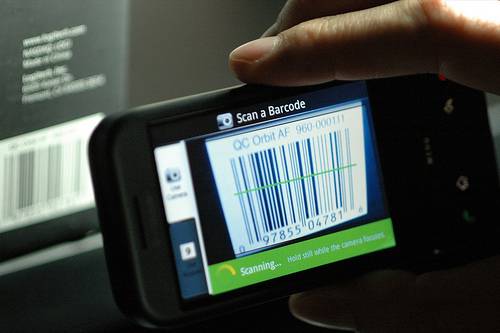
With this app, you can scan the barcode on any item before making a purchase, and it generates a list of the best prices for the item from online and local retailers. With this quick price check, you'll always know if you're getting a good deal.
eBay Deal$ :

You can be an ultra-prepared bargain hunter with this app from eBay. Quickly sort through the best deals in your searches, receive alerts about new bids, and manage your account. The interface is extremely simple, which is a wonderful surprise considering all this app can do.
The Fashion Pixie :

Love high fashion, but not the high price? This app searches designer boutiques and online retailers for the best prices on the clothes you crave. Best of all, you get to skip waiting in long check-out lines!
Meal Ticket :

This GPS-based app connects you with the best restaurant deals in your area, whether you're local or traveling. Coupons for happy hours and price breaks are sent directly to your phone. There's no need to print; the coupons are redeemable just by showing them on your phone.
Garage Sale Tracker :
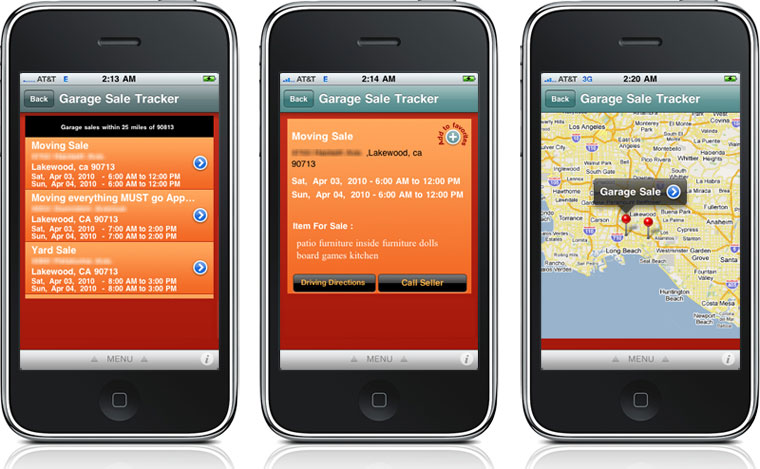
Turn your lazy Saturday morning garage sale trips into strategic missions! This app lets you search garage sales by zip code, generates driving directions on the go, helps you search for items, and even lets you scroll through photos that the seller may have posted. Free for garage sale shoppers, however there is a small price to post your own sale.
Wanderlust :
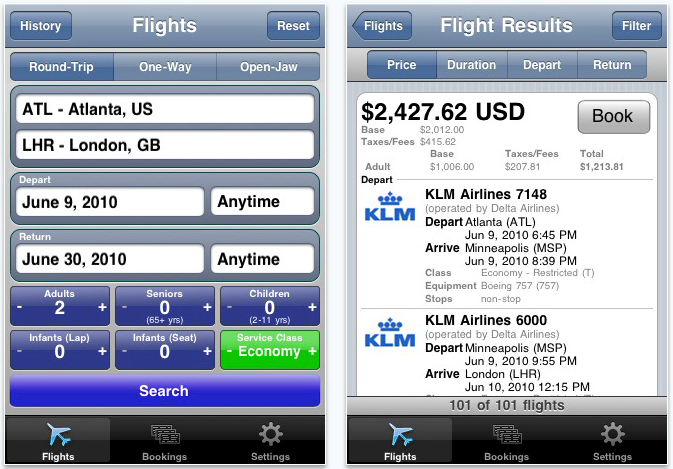
Search airfare from over 400 airlines worldwide to find the best deals on travel. You can book flights, select seat preferences, and apply your frequent flyer number from the app interface.
Priceline Hotel and Car Negotiator :

From the founders of Priceline, this app lets you bid on hotel rooms, up to the last minute. You can search hotels by the neighborhood you'd like to stay in, and by quality. You can book your chosen room though the app as well.
ShopShop :

Admit it, every once in awhile you make an impulse buy. This app helps you avoid those surprise purchases by managing your lists of what you really need. Once you purchase an item off the list, it's removed.
Grocery IQ :

This app helps you grocery shop both faster and cheaper. Create grocery lists by snapping a photo of the barcode of your most frequently purchased items, or typing them in. You can search the coupon gallery for relevant sales or search by specific food categories, and print coupons directly from the app.
RepairPal :

Unexpected vehicle maintenance can be overwhelming, particularly since the reasonable cost of maintenance isnt always clear. RepairPal helps you figure out the accurate cost of your repair, by selecting the model and year of your car, and the parts that need to be replaced.
Stanza :

Stanza is an electronic book reader that lets you customize your reading experience. You can choose your font size and word spacing, save your place, translate vocabulary on the built-in multi-lingual dictionary, and turn the page by tapping the screen. The built-in library links to over 100,000 books.
Cellfire :

Cellfire is a digital coupon database. You can select the coupons you want, and either store them on your phone or load directly to your savings card. When you get to the supermarket checkout, simply show the picture or slide your card to redeem the coupon.
Skype :

Keep in touch with your long-distance pals. You can make free calls to any other person with the Skype app, from anywhere with access to Wi-Fi. You can also send instant messages to one person or a group, and receive incoming calls through Skype.
Bump :

Save money by saving time. Bump lets you swap information with another phone by gently bumping the phones together, saving you the time of adding new information letter by letter. You can swap contact numbers, send payments, and share many other bits of data with one simple bump.
100-money-saving-tips 100+ Money Saving Tips. This App offer simple and effective tips Popular Posts. 10 Must Have iPhone Apps for 2011 Best iPhone App For Money Management. This Apple application goes without saying as a must-have for anybody that remotely cares about personal finance. How To Avoid The Debt Trap With Your First Credit Card · Money Saving How to's and essential tips for iPhone apps money saving on on Software Tutorial.
Tuesday, March 1, 2011
How To Track Your iPad/iPhone/iPod’s Location?
11:50 AM


The GadgetTrak iOS application has been updated and released in to the iTunes Store and allows you to track the location of your iOS devices. GadgetTrak silently reports its location and senses when your iPhone or iPad has significantly changed its location and the GadgetTrak server keeps track of where your phone has been.
With all of the photos, contacts, apps and music on your iPhone, losing it would be a massive pain. Unfortunately, that pain is felt by thousands of smartphone users every day. Ask them—they wish they'd had GadgetTrak installed.
When your device is missing, log into your account using any web browser and enable tracking immediately. GadgetTrak will spring to life and generate location reports, including map points, longitude & latitude and IP address to help you pinpoint your lost device. It can even snap photos of the thief!
For extra security, enable the "Deleting Apps" restriction in Settings App->General->Restrictions. This will keep the thief from deleting GadgetTrak (and any other apps).
But dont forget the application has to be activated before it can start tracking your iPhone or iPad and when it is activated your battery will use more juice than normal.
Features
Location Tracking
If your device has GPS capability it will be used by GadgetTrak to get the most accurate location possible. Even without GPS, GadgetTrak can use cell towers and/or advanced Wi-Fi positioning technology to pinpoint the location of your device usually within a few meters.
IMPORTANT NOTE: Continued use of GPS can dramatically decrease battery life. For better battery performance, deactivate tracking until the device is lost. The GadgetTrak app does not use GPS and will not impact battery life when tracking is disabled (even if the Navigation icon appears).
Push Notifications
GadgetTrak automatically sends a discrete message to your device, enticing the thief to initiate a tracking report.
Camera Reports
Snap a photo with the built in camera(s) to collect crucial evidence to help Police catch the thief. (available for iOS devices with at least one built-in camera, additional in-app purchase required)
GadgetTrak for iOS is part of a suite of products available for a variety of platforms including Mac OS X and iOS. The software enables you to track and recover devices that hve been lost or stolen. New to the 2.5 release of GadgetTrak for iOS is support for cameras. If your iOS device has a built-in camera – such as an iPhone or iPod touch – GadgetTrak will snap photos to help you ad the police identify the thief and location where the device is. The photo can now be attached to an e-mail; the e-mail also includes location information.

Additional Features
• Locate your device using GPS, cell tower triangulation, and/or WiFi positioning
• Location reports posted to the web control panel at http://trak.me
• Location history to know where your phone has been
• Automatic push notifications
• Camera support for the front and rear-facing camera (in-app purchase required)
• Secure SSL connection for transmitting location data & photos
• Cross Platform: GadgetTrak has apps to protect your laptop (Mac & Windows) as well as Android and BlackBerry phones and tablets.
Need Help?
Download the GadgetTrak iOS Installation & Usage Manual here: http://www.gadgettrak.com/support/downloads
http://www.gadgettrak.com/products/iphone/
We take pride in providing great support for all of our products. If you have questions, concerns, or feedback let us know and we'll get back to you as quickly as possible: http://www.gadgettrak.com/support
What's new
• Remotely capture a photo with all built-in cameras, then email it to yourself to help catch the thief! (via a one-time In-App Purchase)
• Push notifications – Send a discrete message to your device enticing the the person who has it to initiate a tracking event.
• Various Bug Fixes.
GadgetTrak now being offered with select warranty plans ActiveTrak has announced that its GadgetTrak Laptop 3 software is now being bundled We contacted GadgetTrak and they sent us all the information we needed to recover the iPod. Luckily it was not necessary to go to the police.
System Requirement
- Requires iOS 4 or higher
- Background processing only supported on iPad, iPhone 3GS, iPhone 4, and iPod touch 3rd generation or newer
Best Top Ten Most Expensive iPad Apps in The World
12:08 AM

To spend a lot of time iPad Apps provide you a best time to utilize by getting this expensive iPad Apps. This includes a lot of things that improve your thought and communication skill. You make the difference in all over the world.
1. Crestron Mobile Pro G- $99.99

By using this device you can easily controlled home automation, controlling environment, through remotes and from touch panels. Wi-Fi or 3G communication you keep in touch with your home, office. Cestron Mobile Pro G is a great invention to view all that you want to see.
2. Fine Luxury Wallpapers by Gatsby-$99.99

Everybody likes wallpapers for your iPad. But especially peoples like those wallpapers who different from others wallpapers. So this a magnificent collection to see Fine Luxury Wallpapers by Gatsby on your iPad. Download the luxury wallpapers for make your iPad attractive.
3. Marine: skagerrak&kattegat HD- $59.99

This application provides great experience for those persons who want to see whole worlds map. There you get chance to see Marine maps for Scandinavia.
4. iProc Pro-$59.99

By using this application you can easily search and look up any procedure code. Any type of description you can find out by iProc Pro. Just you type the words with the range and you search ant text within the procedure code.
5. OmniGraffle- $49.99
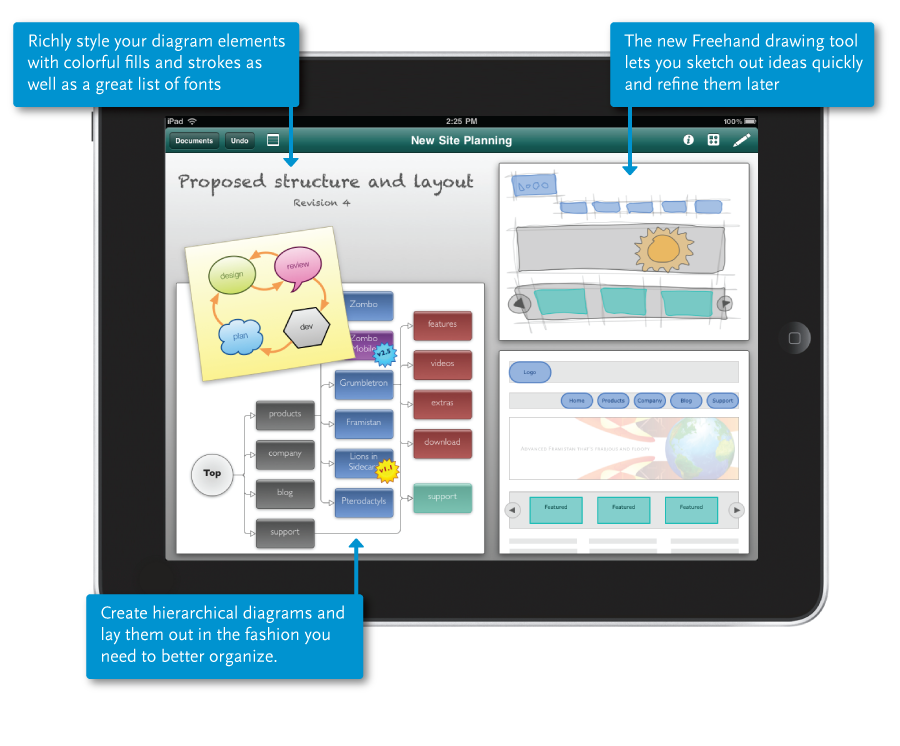
Omnigraffle is made for art & drawing people. This help to make diagrams, charts and different kind of graphics for superior application. You can communicate all over the world by using omnigraffle on your iPad and easily organize your thought.
6. Zeptopad Planner Note- $49.99

Zeptopad planner note is made for those persons who really want to convey their ideas to others. This application supported in businesses to make business chart and SWOT analysis chart for different organization. You can freely draw lines for expose your ideas.
7. SLP Field Kit HD – Consonants- $49.99

SLP field kit is to provide awareness about testing of language pathologist and speech therapist. This application covers all the modules of consonants. SLP field kit provides 8 powerful interactive activities to add dynamic training experiences.
8. ProCamPlus HD– $46.99

This enable to you to record live video and audio streaming. ProCamPlus HD is provide great experience for your iPad. This is a solid offer for all. This provide to you unlimited number of cameras to stream from multiple PCs and laptops.
9. StudioTrack- $39.99

Studio track provide extra features to your music gallery. You can capture musical ideas and can record interesting songs on your iPad. Studios track have the ability to accurate monitor the record level. Multitrack recording is an advance features of studio track.
10. Aurora Sound Studio HD- $39.99

Don’t worry if you want great musician experience then you get aurora software. In which you can make great music on your iPad. You have the full control on your sound in real time. Aurora is a recording base software and provide live performance. Touch and play great music with your friends and share a lot of music.
Monday, February 28, 2011
Top 10 Best Business iPhone Games Must Have
10:49 PM

There aren’t too many business strategy games out there for the iPhone, so it’s nice that games developer launched a new business sim game called A Business Tycoon. A Business Tycoon features classic open-ended gameplay: you start off with $10,000,000 starting funds, which you then use to buy commodities in different regions of the world and then resell them for a profit (the same goes for company shares).
1. Idle Hands

This nifty little app is perfect if you’re a mobile businessman who relies heavily on your iPhone. The annoying virtual keyboard will become your trusted friend after a few games of Idle Hands, which tests your typing and makes you noticeably quicker in just a week or so. It makes emailing a breeze, and will save valuable time in the long run.
2. iGolf

Nothing gets you more ‘in’ with a company CEO than a jolly game of golf, and with this Wii Sports-style app you can practice your swing and get ready to impress for the real thing. Choose from a range of courses around the world and the iPhone will use it’s accelerometer to detect how good your shots are. Just make sure you don’t let go. Another good game that mimics the real thing is Tiger Woods PGA Tour.
3. Trivia Burst

This award-winning quiz game will make sure you’re never stuck for something to say around the water cooler. With over 18,000 trivia questions, which is by far the most in any iPhone game currently available, this little app is an education at your fingertips. You can even add your own questions to the mix, and the more you play the more Amazon.com points you earn to spend online.

4. Easy Relax Ultimate

OK, so a little less on the game side, and more of a straightforward app, but this little gem is a must for unwinding after a tough day at the office, or for helping you concentrate on a complex report. Experts say keeping a clear mind is essential for optimum productivity, so 5 to 10 minutes using this app could actually be time well spent. Binaural beats help you concentrate, relax or fall asleep by inducing the brain to perceive different brainwave states. Play around and see what happens with this hypnotic app.
5. SimCity Deluxe

A complex strategy game where your actions (or inaction) affect the whole of your made-up iPhone world. At $2.99, you get a lot for your money. Build industry and commerce, project manage your metropolis, transform starter locations into prosperous cities… It’s all here. And why is it good for business, you ask? Well, this is life simulation: you can set your Sims’ career-orientated goals, plan out their lives and watch as you build an empire. It’s perfect for anyone who’s in human resources or management, as each Sim needs attention. Neglect them and your city could die. The perfect trial run for your own ambitions.
With a new year 2011, we're bringing back our monthly best game listings. Our ratings for games we Best iPhone Games for 2011 Here you can find top 5 best iPhone games for 2011, these games are the best iPhone games for game lovers, so enjoy best iPhone The 20 Best Free iPhone Games. by Ryan Rigney February, 2011. Just bought yourself a shiny new Verizon iPhone and want some games.
6. Lemonade Stand

Cheap and cheerful – this easy-to-use business game is exactly what it sounds like: you run a lemonade stand. Originally designed for the Mac over 20 years ago, it’s a simple game that taught children back then the basics of economics. Wannabe business tycoons have to deal with variables like bad weather, traffic jams and lemon price inflation; just like the real life struggles of running a successful business.
7. Civilization Revolution

Similar to the SimCity franchise, Civilization Revolution lends itself to the iPhone very well. However, rather than building cities, this one is more about building world-spanning empires. As your power grows you’ll learn to handle all the stresses that come with it – including industrial action and health issues. The game feels very natural, and although it’s 74mb and a whopping $12.99, it’s well worth the download. Learn to be the next Donald Trump and build an empire on your phone. Bad decisions will come back to punish you and you’ll soon learn that being good in business doesn’t come easy.
8. Brain Challenge

This is a mind sharpening game, which is designed to get your brain up and fighting fit for the day. There’s a whole host of brain tests to take, from improving memory skills to honing your reflexes. The makers claim it’s like having a morning coffee – and will kickstart your day. Perfect if you’re feeling sluggish, tired and uninspired for the coming hours at the office.
9. Hotel Dash

Learn to build a successful business with Hotel Dash. The drama and chaos of running your own virtual hotel is addictive, and it takes true business acumen and ambition to make it thrive. Soon you’ll be renovating and rescuing hotels all over DinerTown, and through good customer relations achieving 5-star service. The vivid Retina Display artwork makes Hotel Dash an added pleasure to play.
10. A Business Tycoon

Buy low, sell high… that’s the basic premise of this game – and actually the basic premise of most successful business models, meaning valuable lessons can be learned from this app. You fill the shoes of the next big business tycoon – think Donald Trump, or the UK’s Alan Sugar – and as well as loads of hot business deals, there are also loads of hot luxuries to buy with your well earned cash. This sophisticated app teaches you about stocks and shares, selling assets, taking loans, lending money and how to read charts and complex data. All invaluable skills if you want to become better at business.
We've taken the thousands of awesome iPhone games released in 2011 and narrowed them it's hard to imagine what 2011 will hold for iPhone gaming. Post Tags: best games of 2011, best iPhone games,We've sifted through the thousands of games and have settled on these 36 titles to enthusiastically recommend Best iPhone Games 2011.
Saturday, February 26, 2011
Most Wanted Smartphone Mobile App Stores
11:13 PM

The first thing you'll notice about these efforts—coming from such traditionally competitive companies as Palm, BlackBerry, Nokia and Microsoft—is just how similar they all sound. App World? App Catalog? App Market? Mobile Marketplace? This outward likeness actually runs pretty deep—these stores are advertising uncannily similar feature sets, for both users and developers:

Although it might not evident in the feature-by-feature breakdown above, there are two distinct kinds of app store: The primary store, which is the first and only source of an OS's apps (see Apple), and the secondary store, which is built around an existing stock of third-party apps, and with preexisting developers in mind (see BlackBerry, Microsoft, and Nokia). It's a combination of these different lineages and divergent policy choices that make the smartphone app store experience so varied.
 Apple's iPhone App Store
At least for now, the App Store is the standard by which all others are judged. Beyond that, it's given us a rough guide for what works. With a $99 dollar developer's fee and a novice-friendly SDK, the barriers of entry for an iPhone developer are fairly low. Distribution, payments and to a large extent marketing are managed by iTunes, which iPhone owners are necessarily familiar and comfortable with.
And, of course, there's the iPhone: This store may only serve one handset (and its very similar nonphone brother), but it's a wildly popular one. This makes the app store uniquely attractive to developers, because it provides access to the largest uniform app-buying market in the world. Microsoft can argue that Windows Mobile 6.5 will connect developers to x gajillion different customers through y zillion different handsets, but this variety is a curse: Handsets have different resolutions, processors, 3D hardware, input types and basic feature sets. A motion-sensing 3D game with a GPS social networking feature won't work on a lot of WinMo handsets, but a 2D, keypad-controlled Asteroids clone won't make a developer rich.
But the App Store is far from perfect. Apple, like all App Store owners, has the final say in what gets listed, delisted or banned, and they aren't afraid to remind us of this. Along with the typical risque/racist/infringing content prohibitions, Apple enforces strict and often limiting rules against apps that compete with the iPhone's native set—iTunes, Mail.app, Safari to name a few—and apps that their partnered carriers aren't too fond of, i.e video streaming and tethering apps. Now, all these rules are showing signs of loosening with OS 3.0, but as long as the App Store is the sole source of iPhone apps, any rules will seem like too many rules—especially if you're accustomed to a totally unregulated system like Windows Mobile 6.1's. Hence, the gray market.
 Android App Market
This second major entrant into the app store race represents a consciously different approach than Apple, but not in that many ways. Immediately, we see a lot to compare: A single-handset userbase (at least for now), low costs for developers and a presence as the primary—though not sole—source of apps from Day One.
But the App Market is a different breed than the App Store. Most importantly, it's not the only place you can get apps. Google has been much more lenient about what they allow in their store since the beginning but in the rare case that they don't approve of an app, as in the case of tethering apps earlier this month, you can just go download an .APK file and sideload it onto your G1 anyway. This is a healthy middle ground for everyone involved; Google doesn't alienate users by destroying entire categories of apps, but isn't forced to come into conflict with carriers because of overly liberal policies. Google has also made their Market more friendly to consumers, with a no-questions 24-hour return policy.
Great! Then why is the App Market so underwhelming? Well, the G1 wasn't exactly a runaway hit, and the store got off to a slow start. Paid apps weren't made available for months after launch, and when they arrived they didn't benefit from the convenience and familiarity of a storefront like iTunes. Moreover, there's no guarantee that things will change that much in the coming months—more handsets from more manufacturers will boost Android's user numbers, but will lead to the WinMo-style toxic fragmentation that Apple so adamantly avoids.
 BlackBerry App World
Matt took a dive into the newest mobile app store, and found it agreeable, but not spectacular. RIM's is the beginning of this "secondary" app store concept, and it shows: You'll be hard-pressed to find anything here that wasn't previously available elsewhere. It is simply an aggregator for existing applications.
This was a given, as developers have been cranking out BlackBerry apps for years now. But App World was a great opportunity for RIM to give the lethargic dev community a shot in the arm. Instead of doing that, they've made the store almost hostile to would-be app writers.
Listing your wares in App World costs a hefty $200, which gives you the right to upload 10 apps, but doesn't come with any new SDKs or development tools. The payment system is Paypal, which is clumsy to use and a pain to set up. A minimum non-free price tier of $2.99, probably intended to filter out spammy apps and cover Paypal's transaction fees, discourages developers from even trying to make simple, useful apps, eliminating the $.99-to-$1.99 sweet spot that has been central to Apple's success. App World feels like an afterthought, and a reluctant one. UPDATE: It should be noted that the 70% dev revenue share figure in the chart is incorrect, and has been update to 80%—a marked advantage over the other stores.
 Windows Mobile Marketplace
With Windows Mobile 6.5, Microsoft will introduce the Windows Mobile Marketplace. So far, their announcements have shown an awareness of the pitfalls of both Apple's and RIM's approaches: They're emphasizing non-exclusivity and app approval transparency, a 24-hour return policy and wide device support, but also making sure to get big-name app and game developers on board to ensure that users actually have something new to look forward to at launch.
On the developer side, it's a mixed bag. As in every other store, the dev take-home is 70% of each sale, but the listing fees aren't great. $99 gets you five apps a year, but anything beyond that will cost an additional $99. I'm sure this will help vaccinate the Marketplace against the fart app epidemic that Apple has proven so prone to, but it'll do so at the expense of potentially useful free and $0.99 apps—again, a crucial price range. One important factor that's still TBD is the payment system. Microsoft says they'll support both credit card payments and carrier charges, but hasn't yet said how that'll look. In both cases the process will need to be as seamless as possible.
 Nokia Ovi Store
You probably haven't heard much about this store, set to debut within a month, but it's kind of a big deal for the 40m+ Symbian S40 and S60 users that it'll serve apps to. It's planned to shoehorn into Nokia's new Ovi app suite, which we were introduced to with the XpressMusic 5800, and provide a go-to source for not just apps, but ringtones, wallpapers, and basically everything else that you might have found in a 2001 vintage carrier WAP store.
There has been a decided lack of fanfare surrounding this launch, probably because there just aren't that many Nokia smartphones in the US. But its success or failure will be informative: It will be the most open of all the app stores. For the time being, there is no developer fee, and app listings are free and unlimited. You can easily publish tons of different kinds of content—Flash Lite apps, Java apps, Native S60 apps, multimedia uploads and others—which will be subject to a vetting process that Nokia has assured will be minimal. As Nokia-averse Americans, we can view the Ovi Store as an experiment in laissez-faire app-mongering—a multi-handset, mixed-media, unfiltered feed of Symbian content.
 Palm App Catalog
And finally, we have Palm's App catalog. This is the store we know the least about, but that is already set for a different course than all the others. At launch, the only handset it'll serve will be the Pre—though Palm has indicated that other WebOS handsets are inevitable. It'll be the first—and likely exclusive—source of WebOS apps, and developers will be furnished with a solid, though fundamentally limited, SDK.
Palm's still-vague plan for the App Catalog will no doubt be central to the success or failure of the Pre, but we can make an educated guess at what to expect, assuming that Palm doesn't get taken over by idiots in the next couple months: Palm will vet the apps thoroughly, provide an in-house payment system, and make development simple and cheap (previewed Mojo SDK apps have shown great promise). The end result will probably look something like the iPhone App Store, but with one huge difference: there will be no local natively running apps—the Mojo SDK doesn't provide for that, just for what amount to turbocharged, locally-stored web apps. Granted, these web apps will have privileged access to some of WebOS's core functions, but it's doubtful that high-end gaming, as we've seen on the iPhone, will even be possible on the platform. These limitations (along with WebOS's multitasking advantages) will affect the nature and quality of the apps that are listed in the store much more than the Catalog's policies, though exactly how, we'll have to wait and see.


